

Sales order management software helps businesses capture, track, and fulfill customer orders from a sale is confirmed to the final delivery and invoice. It connects sales, inventory, warehouse, and finance so teams can handle orders accurately and on time.
If orders are getting harder to track, stock levels feel unreliable, or fulfillment mistakes are starting to cost time and money, it’s time to choose a sales order management software to handle everything.
This guide is built for teams that are moving beyond spreadsheets, email, or disconnected tools where we review the top sales order management software. You will see how different platforms handle core tasks, where each tool works well, where it falls short, and what kind of team it is built for.
Who Needs Sales Order Management Software?
B2B Wholesalers
Wholesalers often have a lot going on behind a single order. A customer may have special pricing, volume discounts, payment terms, or repeat buying patterns that need to be handled correctly every time. Also, orders come through many sources like email, phone, or sales reps, which gets messy very quickly.
A sales order management system helps standardize order entry, apply customer-specific pricing, and keep stock levels accurate across all orders.
Distributors
For distributors, the challenge is knowing where stock is, which warehouse should fulfill the order, and how to avoid delays when supply is tight. With the right system, teams can see real-time inventory, split orders when needed, and avoid delays caused by stock mismatches.
Manufacturers
Manufacturers need to connect sales orders with production planning. A new order can affect production schedules, raw material planning, delivery dates, and internal workload all at once. If sales and production are not connected, the sales team promises one timeline while the factory is working with another.
Sales order management software links incoming orders to production workflows, making it easier to plan capacity and avoid overpromising delivery dates.
Omnichannel retailers
Retailers selling across multiple channels such as physical stores, marketplaces, and online shops face order synchronization challenges. Orders can come from different sources at the same time, and inventory needs to stay consistent everywhere. A centralized system improves inventory visibility by combining all orders into one view, reduces overselling, and keeps fulfillment smooth across channels.
Ecommerce brands
Growing ecommerce brands often start with simple tools, but things get complicated as order volume increases. Managing returns, tracking shipments, and handling customer requests manually becomes time-consuming. Sales order management software helps automate these steps, improve order visibility, and create a more reliable fulfillment process.
How We Evaluated the Software?
| Criteria | Weight | What We Looked At |
| Operational Efficiency | 35% | Real-time inventory sync speed, automated order routing, and batch processing capabilities. |
| Ease of Implementation | 20% | Average “Time-to-Value,” quality of onboarding documentation, and technical support availability. |
| Integrations | 20% | Native connectors for Shopify, Amazon, QuickBooks, and popular 3PLs without requiring custom code. |
| Total Cost of Ownership | 15% | Subscription tiers, hidden API fees, and costs for adding additional users or sales channels. |
| Scalability | 10% | The system’s ability to handle sudden order spikes (e.g., Black Friday) without latency or data drops. |
8 Best Sales Order Management Software
| Software | Best For | Key SOM Feature | Starting Price (Est.) |
| Nūl | AI-Driven Automation | Predictive Logic & Autonomous Exception Handling | Custom |
| Oracle NetSuite | Enterprise ERP | Unified global billing & multi-subsidiary sync | Quote based |
| Odoo | Customization | Open-source modularity with custom Studio actions | 0 – $17/month |
| Zoho Inventory | Small Business | Affordable multi-channel sync (Shopify/Amazon/eBay) | $39 – $299/month |
| Jotform | Fast Deployment | No-code AI Agents for rapid order capture | Free tier available
Custom price |
| Brightpearl | Retail & Wholesale | Automated retail-specific fulfillment & routing rules | Quote based |
| Extensiv | High-Volume E-com | Intelligent multi-node routing (3PL/FBA centers) | Custom |
| Katana | Manufacturers | Live “Traffic Light” material availability for MTO | Free tier available
$299/month for core plan |
Nūl – Best for AI-Driven Order Automation
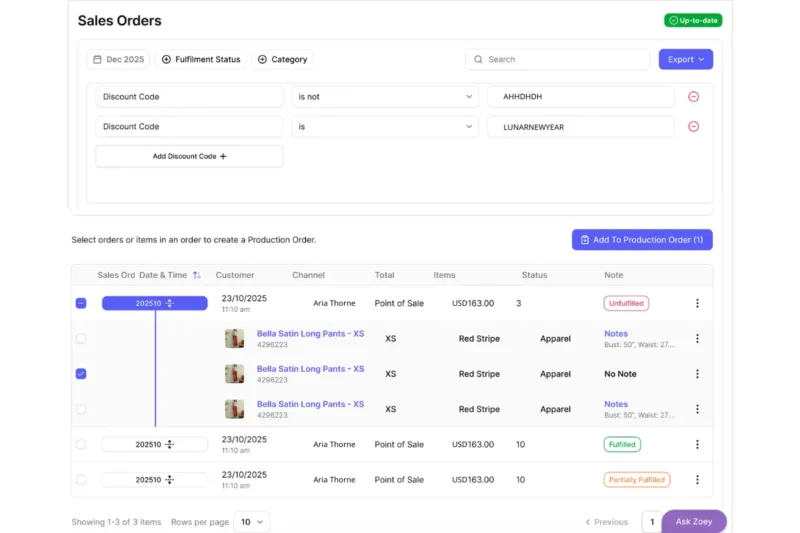
Nūl is a next-gen sales order management software using AI to handle the whole process. While many traditional systems rely on static “if-this-then-that” rules, Nūl uses a proprietary Predictive Logic Engine to manage the order lifecycle. For brands that have outgrown manual workflows but don’t want a heavy ERP, Nūl is a good option.
Autonomous Exception Handling is one of Nūl’s standout features. Most OMS tools flag an error (like an incorrect shipping address or a stockout) and wait for a human to fix it. Nūl’s AI proactively suggests or automatically executes solutions, such as routing the order to warehouse B if an ordered item is out-of-stock at warehouse A.
Key Features:
- Self-Healing Workflows: The AI learns from your previous manual corrections to automate future order exceptions.
- Granular SKU Management: Tracks specific attributes like “XS / Red Stripe” with real-time status updates (Unfulfilled, Fulfilled, Partially Fulfilled) directly within the sales order view.
- Production-Integrated OMS: Links sales demand to manufacturing; a high-volume sales order can automatically trigger a “Production Order” if raw materials are available.
- Multi-Channel Visibility: Separates “Point of Sale” (physical retail) from other digital channels, providing a unified view of the customer (e.g., Aria Thorne’s order history).
- Natural Language Querying: Ask Zoey – an AI co-pilot for:
- Data Analysis: “Zoey, show me a table of sales orders from the last 24 hours where the customer used the ‘LUNARNEWYEAR’ code but the order is still unfulfilled.”
- Direct Action: “Zoey, trigger a 10% discount on all open sales orders for slow-moving inventory in the Northeast region.”
Pros:
- Reduces manual work during order processing.
- Modern, intuitive UI that is easy to use with very low training time.
- Faster implementation compared to legacy systems.
Cons:
- AI features only work best with enough historical data.
- Built mainly for cloud-first operations, not offline-heavy workflows.
Oracle NetSuite – Best for all-in-one ERP control
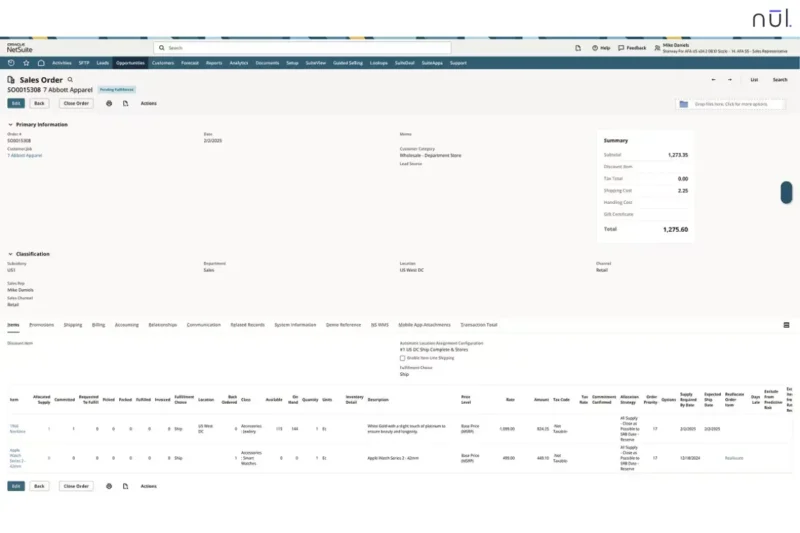
Oracle NetSuite is an all-in-one cloud ERP, with sales order management as part of a larger ERP system including finance, inventory, and CRM. This ERP is suitable for mid-market to enterprise companies that need to manage complex, global sales operations.
NetSuite is famous for managing orders across multiple subsidiaries, currencies, and tax jurisdictions. If a sales order is placed in London for a customer in New York, NetSuite automatically handles the currency conversion, intercompany transfer, and localized tax compliance in real-time.
Key Features:
- Automated Billing Schedules: Supports complex payment structures, such as deposits, milestone payments, and delayed balances for larger B2B orders.
- Advanced Order Orchestration: Uses business rules to route orders through the most efficient fulfillment path based on factors like shipping location, delivery time, and cost.
- 360-Degree Customer View: Connects every sales order to a full customer record, so teams can see order history, payment activity, and support context during the sales process.
- Real-Time Financial Impact: Each order can update financial records right away, including accounts receivable, inventory value, and the general ledger.
- Gated Approval Workflows: Sales orders can be sent automatically for manager approval when they pass a certain value, discount level, or risk threshold.
Pros:
- Offers advanced audit trails, controls, and security features (SOC 1/SOC 2) for businesses with stricter governance needs.
- No need for third-party integrations between your sales desk and your accounting department.
Cons:
- Setting up NetSuite usually takes months and often needs outside consultants.
- High licensing costs and implementation fees make it a large financial investment, especially for smaller teams.
Odoo – Best for flexible customization
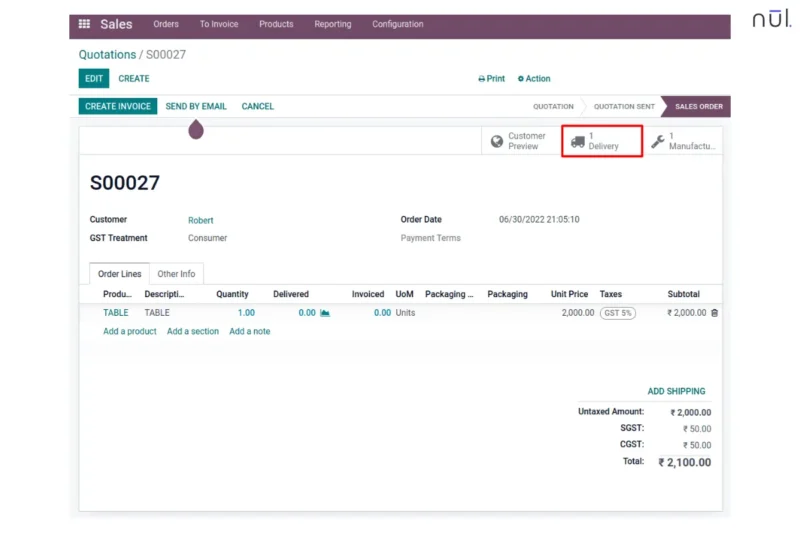
Odoo is a modular ERP that gives businesses more freedom to customize the system around their own workflow. No fixed setup, Odoo lets users start with the parts they need first, such as sales order management, then add other apps like inventory, manufacturing, or accounting later. This is an optimal choice for businesses with unique order workflows that don’t fit into a standard software.
Also, Odoo’s Studio allows teams to build custom rules inside the order process without depending too much on developers. For example, a business can create a rule that adds a handling fee when an order includes fragile items, then automatically alerts the warehouse team to use special packaging.
Key Features:
- Multi-Variant Matrix: Manage complex sales orders for products with dozens of attributes (e.g., a shirt available in 5 sizes, 10 colors, and 3 fabric types) in a single grid view.
- Integrated Customer Portal: Every sales order generates a unique URL where customers can track their shipping status, download invoices, and sign contracts electronically.
- Flexible Inventory Routes: Businesses can create custom inventory rules, including dropshipping flows and automated stock movement based on order activity.
Pros:
- The system can be adjusted to fit unusual workflows instead of forcing the business to change everything around the software.
- Compared with many ERP systems, Odoo feels more modern and easier to use.
Cons: If a team adds too many custom rules or changes, the system can become harder to maintain and upgrade later. Also, complex setups often require Odoo partners or technical support, which adds to the total cost.
Zoho Inventory – Best for small businesses
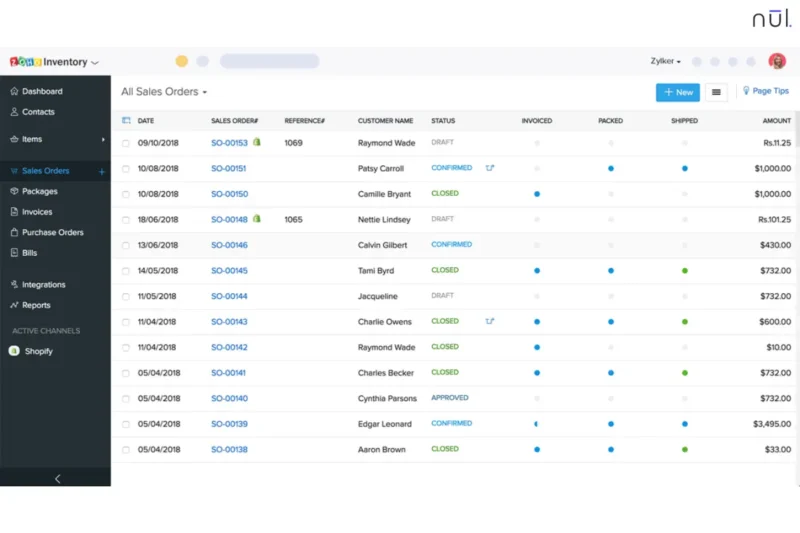
Zoho Inventory centralizes orders from diverse marketplaces like Shopify, Amazon, Etsy, and eBay into a single, manageable dashboard. This multi-channel syncing feature makes Zoho Inventory as a central hub for your entire e-commerce ecosystem.
When a customer places a sales order on Amazon, the system instantly fetches the details, updates your stock levels across all other connected platforms and prepares a packing slip. Zoho is an user-friendly tool designed for growing SMBs and multi-channel retailers looking for strong features without an expensive ERP.
Key Features:
- Instant Sales Order Conversion: Teams can move from quote → sales order → package → invoice in a few clicks and still keep a clear record of each step.
- Order Merging & Splitting: Multiple sales orders from the same customer can be combined into one shipment, or a large order can be split across locations if needed.
- Smart Backordering: Automatically trigger a Backorder and create a Purchase Order to your vendor to fulfill that specific demand if a sales order is placed for an item with zero stock.
- Integrated Shipping Rates: Connects with carriers like UPS, FedEx, and DHL to show real-time shipping rates and print labels directly.
- Composite Item Support: Handles bundles or kits by automatically adjusting inventory for each component when an order is placed.
Pros:
- Include a free plan and affordable tiers with features that many small businesses actually need.
- Integrate smoothly with Zoho Books and Zoho CRM for a more connected workflow.
- Have a top-rated mobile app that is easy to manage sales orders and check stock levels from anywhere.
Cons:
- Most plans have a monthly limit on the number of sales orders and shipping labels you can process.
- Syncing with non-Zoho accounting software (like Xero or QuickBooks) can sometimes be less smooth.
Jotform – Best for low-cost, template-based tracking
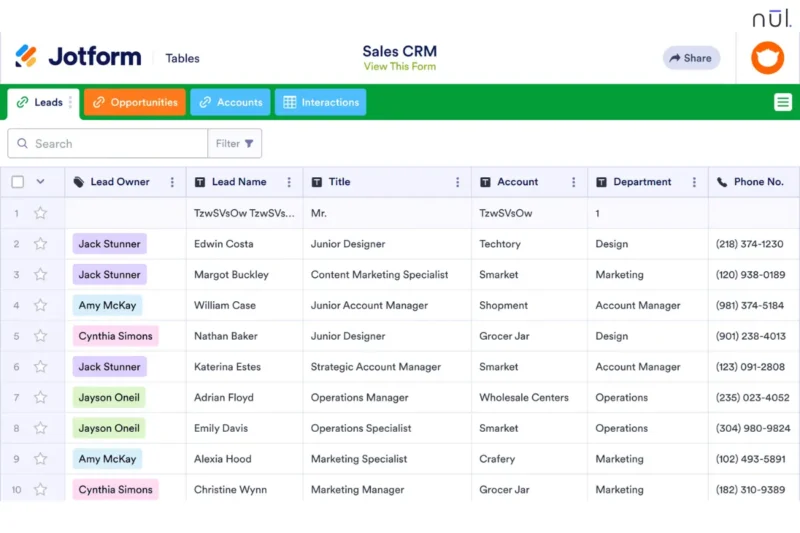
Jotform has evolved from a simple form builder into a no-code automation platform to digitize sales order processes instantly without a traditional complex ERP. By combining drag-and-drop forms with “Jotform Tables” and “Workflows,” it creates a complete system for capturing, tracking, and fulfilling orders for small-to-medium businesses.
Jotform’s newest innovation is its conversational AI agents that interact with customers to validate their orders, suggest upsells, and calculate dynamic pricing in real-time. If a customer is confused about a bulk discount, the agent handles the inquiry and completes the sales order autonomously.
Key Features:
- No-Code Workflow Builder: Teams can build an order process without coding. For example, a submitted sales order can go to a manager for approval, then trigger a PDF invoice and notify the warehouse.
- Jotform Tables: Every new sales order can flow into a table view, where teams can track fulfillment status, assign tasks, and filter orders more easily.
- Integrated Payment Gateways: Jotform connects with Stripe, PayPal, Square, and other payment tools, so businesses can collect payment and update order status in the same workflow.
- Automated PDF Generation: Sales order details can be turned into invoices, receipts, or packing slips automatically and sent to the customer right away.
- Conditional Logic for Ordering: Forms can change based on customer choices, so users only see relevant products, delivery methods, or pickup options.
Pros:
- Products, prices, and steps can be updated without much technical effort.
- The entry cost is low, and there is also a free tier.
Cons:
- Does not offer the deeper inventory and warehouse logic found in more advanced OMS tools.
- As volume grows, managing a very large number of orders in table form can become harder than using a full database-driven system.
Brightpearl – Best for retail and wholesale
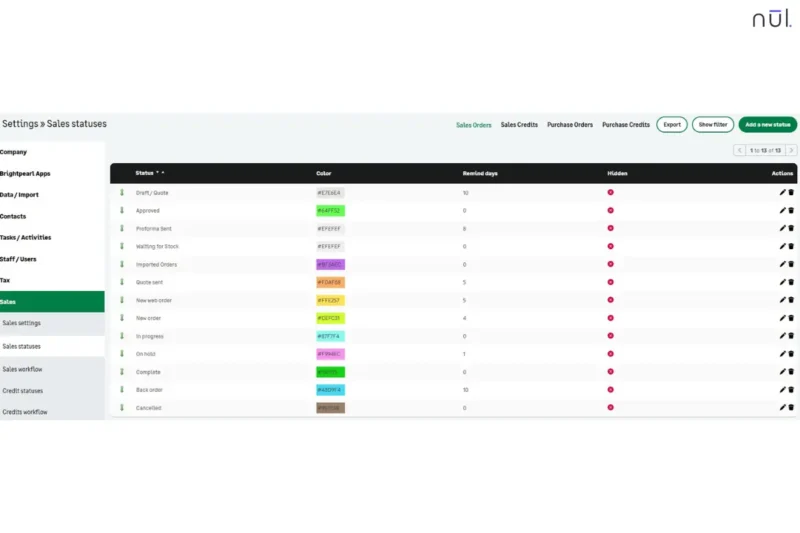
Brightpearl is built for retail and wholesale businesses that handle a large number of orders across different channels. It is often known as a retail operating system because it focuses heavily on order processing, inventory updates, fulfillment, shipping, and post-purchase operations. For fast-growing brands doing $1M+ in annual revenue, Brightpearl is a suitable choice.
Brightpearl’s code-free automation allows operations managers to build complex fulfillment logic in minutes. For example, you can create a rule like: “If a wholesale order exceeds $5,000, automatically flag it for credit review and hold fulfillment until the deposit is cleared, but continue to auto-fulfill all standard Shopify retail orders.”
Key Features:
- Hybrid Channel Support: Handles both retail and wholesale orders in one system, including custom price lists, bulk orders, discounts, and payment terms.
- Smart Order Routing: Automatically routes sales orders to the most efficient fulfillment point, whether that’s a local warehouse, a 3PL provider, or a Dropship vendor.
- Real-Time Inventory Sync: Prevents overselling by instantly updating stock levels across all channels (Amazon, eBay, Shopify, etc.) when a sales order is placed.
- Automated Backorder Allocation: When a sales order is placed for an out-of-stock item, the system can automatically “tag” it for a Back-to-Back Purchase Order and allocate the stock when it arrives at the dock.
- Integrated POS: Capture sales orders in-person at trade shows or physical stores using the integrated POS app, which syncs directly with your central inventory and wholesale database.
Pros:
- Provides advanced reporting on “Customer Lifetime Value” and “Product Profitability” across both retail and wholesale channels.
- Repetitive tasks such as invoicing, routing, and fulfillment can be handled much faster.
Cons:
- It can handle assembly and bundles, but it is not designed for detailed production control.
- Smaller teams may find the system more complex and more expensive than they need.
Extensiv – Best for high-volume ecommerce
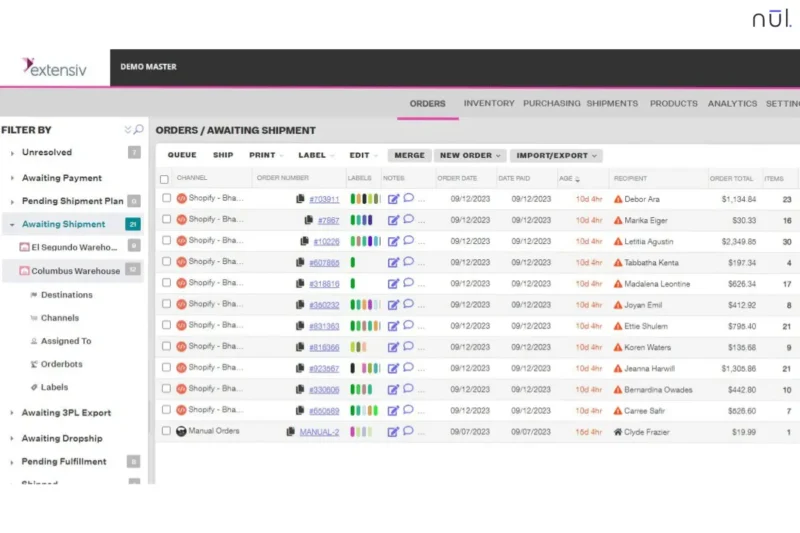
Extensiv (formerly Skubana) is a high-performance order management system (OMS) built for ecommerce businesses who move thousands of units across dozens of marketplaces simultaneously. It can handle multi-location fulfillment, where inventory is spread across a mix of in-house warehouses, 3PLs, and Amazon FBA centers.
Extensiv’s Orderbot technology automatically evaluates every incoming sales order against your entire supply chain network. For example, if a sales order comes in from a customer in Los Angeles, the system determines if it’s cheaper to ship from West Coast 3PL or in-house warehouse to ensure the highest profit margin.
Key Features:
- Multi-Warehouse Inventory Logic: Gather stock levels from all 3PLs and FBA centers into a single “Available to Sell” (ATS) count for your Shopify or Amazon storefronts to prevent overselling.
- Intelligent Order Routing: Automatically route sales orders based on pre-set rules like “Lowest Shipping Cost,” “Fastest Delivery Time,” or “Warehouse Stock Balance.”
- Automated PO Generation: Use sales trends and reorder points to create purchase orders.
- Cross-Channel Analytics: Helps teams understand SKU performance by looking at costs such as shipping, marketplace fees, and storage.
Pros:
- Works well for brands with large order volume and more complex fulfillment setups.
- Gives fulfillment teams clearer inventory and order data, which helps reduce mistakes.
Cons:
- The interface is built more for speed and control than simplicity, so new users may need time to adjust.
- Extensiv is better suited to larger ecommerce operations than early-stage retailers.
Katana – Best for manufacturers
Katana is a modern Manufacturing Resource Planning (MRP) platform that combines making and selling in a single synchronized workflow. This tool is suitable for D2C and B2B manufacturers who need to know exactly how every sales order impacts their raw material stock and production floor.
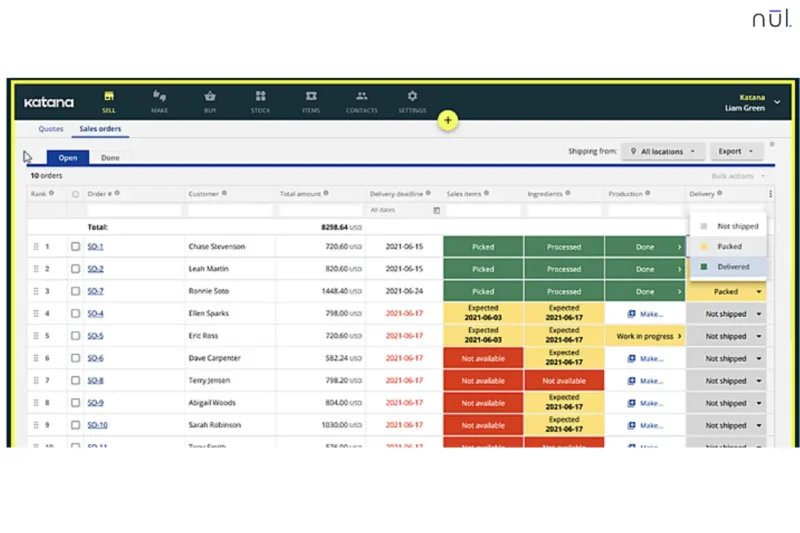
Its standout strength is real-time availability logic. As soon as a sales order is created, Katana checks if the item is ready to ship (Green), if it can be made with available materials (Yellow), or if more materials need to be purchased first (Red). It shows this clearly through a simple traffic-light view, which helps teams see what is ready to ship and what still needs work.
>> Read more: Make to Stock vs Make to Order: What’s the Difference?
Key Features:
- Make-to-Order Automation: Sales orders can connect directly to work orders, so custom items or out-of-stock products move into production planning right away.
- Live Material Requirements Planning: When a new order comes in, Katana reserves the needed raw materials so they are not used by mistake for another job.
- Drag-and-Drop Prioritization: Teams can move urgent orders to the top of the production schedule, and the system will recalculate timelines for the rest.
- Multi-Channel Manufacturing: Pulls orders from ecommerce channels like Shopify, WooCommerce, and Amazon, then combines them with production workflows in one place.
- Floor-Level Task Tracking: Links order demand to shop floor activity, so teams can see exactly what needs to be made and when.
Pros:
- Works well with modern ecommerce tools, which makes it attractive for D2C and B2B manufacturers.
- Tracks materials and labor more clearly, which helps businesses understand the real cost of each order.
Cons:
- Advanced shipping and label workflows often need a separate integration.
- If the business does not manufacture products, many of Katana’s features may feel unnecessary.
Conclusion
Good sales order management isn’t just about tracking shipments, it’s about how much manual labor you can remove from the process. The right sales order management software depends entirely on where your business currently feels the most friction.
Before you sign a contract, we recommend a three-step validation process:
- The SKU Stress Test: Ask the vendor to demonstrate how their system handles your most complex product (e.g., a bundle with 5 variants).
- The Integration Audit: Verify that their native connection to your sales channel (Shopify, Amazon, etc.) supports real-time sync, not just hourly batches.
- The Pilot Project: Start with a single sales channel or warehouse location to ensure the UI fits your team’s daily workflow.
By prioritizing automation and data accuracy today, you aren’t just managing orders, you’re building a scalable engine for today and beyond.