

Sales orders sound simple on paper: a customer buys, you ship, you get paid. But in real life, there are many issues. A missing SKU, a wrong price, a stock number that isn’t updated, or an approval stuck in someone’s inbox can all become serious troubles. They can turn one order into a chain of delays, customer complaints, split shipments, inventory discrepancy, refunds, and frustrated customers.
This guide breaks sales order management down in a clear, practical way: how the full process works, where the common failures happen, and how you can improve with automation and AI.
What is Sales Order Management?
Sales order management is the end-to-end process of handling a customer’s order from the order is confirmed to when it’s delivered, paid, and closed. Sales order management is the big picture: controlling the whole flow, reducing mistakes, and keeping orders moving smoothly across sales, warehouse, and finance.

Key Stages of Sales Order Management
Stage 1: Order capture
The order comes in from sales reps, email, eCommerce, website EDI, phone, etc. You receive and record the right details (SKUs, quantity, price, and shipping address). If possible, confirm the order with the customer and lock the key terms.
Stage 2: Validation & approvals
Internal checks happen before fulfillment. The goal is not to let a bad order reach the warehouse. 3 important things you must check carefully:
- Inventory Check: Do we actually have this in the warehouse (or in the right location), and can we reserve it for this order? If stock is short, mark it as backorder/split shipment/substitution before approval.
- Credit Check: Does this customer have unpaid bills, credit limits, or payment terms that block new shipments? If yes, the order is put on hold until finance clears it.
- Price check: Validate the order using the current markdown pricing strategy and only approved discounts. Block expired promo codes, wrong customer pricing tier, and unexpected manual price edits.
Stage 3: Fulfillment (pick, pack, ship)
The order arrives at the warehouse at this stage. Warehouse’s staff will do:
- Picking: Grabbing the right items from the racks.
- Packing: Using the right box size and protection so nothing breaks.
- Shipping: Creating the label and handing it to the carrier.
After shipment, the customer receives tracking updates. Internally, the team monitors late pickups, delivery delays, failed deliveries, and partial shipments. All issues should be caught early instead of waiting for complaints.
Stage 4: Invoicing & payment
In e-commerce, payment is often collected upfront. In B2B, this is the point where you issue the official invoice based on what actually shipped.
- Create the invoice (or capture payment, depending on the business model).
- Handle adjustments, discounts, shipping charges, and taxes.
- Track payment status until closed.
Stage 5: Returns, exchanges, and order closure
If a customer needs to return an item or if something arrives damaged, you need a reverse version of this process. A clean ecommerce returns management flow helps you avoid lost items, slow refunds, and inventory confusion.
- If needed: return authorization, inspection, restocking, refunds/credits.
- Close the order once it’s fully delivered and settled.
How to Apply Automation in Sales Order Management?
Automation in sales order management means you turn repeatable steps into rules so orders are handled automatically without someone chasing updates in email, spreadsheets, or chat. Here how automation helps in each stage:
Capture: Automated Data Sync
Connect your storefronts and sales sources (Shopify, Amazon, B2B portal, sales form) to your Sales Order Management System (OMS) using APIs or an integration tool like Zapier or Nūl.
When an order is placed, it appears in your OMS and warehouse queue right away with no manual copy-paste, no email forwarding, no spreadsheet cleanup. You no longer need to re-enter the same order details in multiple tools.
Validation: Rule-Based Approvals
AI cross-references the order against historical data and real-time bank feeds. If a customer who usually buys 10 units suddenly orders 1,000, the AI flags it as a potential typo or fraud. It automatically checks international trade laws and shipping restrictions for global orders.
Inventory Allocation: Smart Reactive + Proactive
Instead of sending orders to a default warehouse, AI routes each order to the most optimal warehouse that can deliver fastest at a reasonable cost.
What AI considers:
- Available local stock (after reservations)
- Warehouse workload (cutoff times, staffing, queue size)
- Carrier conditions (on-time performance, backlogs, strikes)
- Disruptions (weather, road/port delays)
Also, if Warehouse A is overloaded or disrupted, the system can reroute to Warehouse B automatically (within your rules).
Especially, not just reactive, AI can also predict demand and help replenish stock before orders arrive. You know, moving inventory to the right locations early can reduce backorders, split shipments, and costly expedited shipping.
Fulfillment: Automated Pick, Pack, Ship
Automation turns fulfillment into a guided workflow, so staff don’t rely on paper lists or memory.
- Auto-create pick tasks: The moment the order is approved, it shows up in the warehouse queue.
- Scan-to-confirm: Staff scan items to confirm the right SKU and quantity before packing.
- Auto-print labels: The system prints the shipping label and tracking number based on your carrier rules.
- Update stock instantly: As soon as items are picked/packed, inventory is updated across all sales channels, so you don’t oversell.
Logistics: Proactive Tracking
Once the package leaves the warehouse, you still need to track delivery to catch issues early.
Send tracking updates on real milestones: label created → picked up → in transit → delivered. Trigger internal alerts on exceptions: delay, failed delivery attempt, damaged scan, partial shipment
AI monitors the carrier’s progress and traffic patterns to provide a hyper-accurate delivery window. If a delay is detected (e.g., a storm), the system automatically emails the customer to apologize before they have a chance to complain.
Payment: Automated Revenue Recognition
The moment the package is scanned as “Delivered,” the system triggers the invoice and initiates the payment process. It matches the final shipment to the original quote and updates your financial reports instantly. The order is closed only when shipment + billing are complete
Benefits of Automated Sales Order Management
Faster “Order-to-Cash”: A strong sales order management process removes delays between the order and the payment landing in your account. When sales, warehouse, and accounting hand off work through the system (not emails), an order that used to take days to move can move in hours.
Improved Accuracy: When order details are checked and standardized, you avoid the human mistakes like wrong SKU, wrong quantity, wrong address, wrong price. That means fewer returns, fewer re-shipments, and less time spent fixing issues after the fact.
Reduced Overstock: Modern SOM keeps real-time inventory visibility by syncing stock across your website, marketplaces (like Amazon), and your warehouse. That way you only sell what you can actually fulfill.
Cost Savings: Efficient order management saves money in places you might not expect:
- Labor: less busywork (copy-paste, data entry, chasing approvals), more time for real work.
- Shipping: rules can pick the cheapest carrier and route, saving you thousands in freight costs over a year.
- Inventory: clearer view of what’s moving vs sitting, so you stop overbuying slow stock.
Enhanced Customer Experience: With accurate and on time shipment, updates at key milestones for customers, you can reduce cancellations, delays, and complaints. Thus, you can improve customer experience and increase repeated buy.
How Nūl Can Help With Sales Order Management?
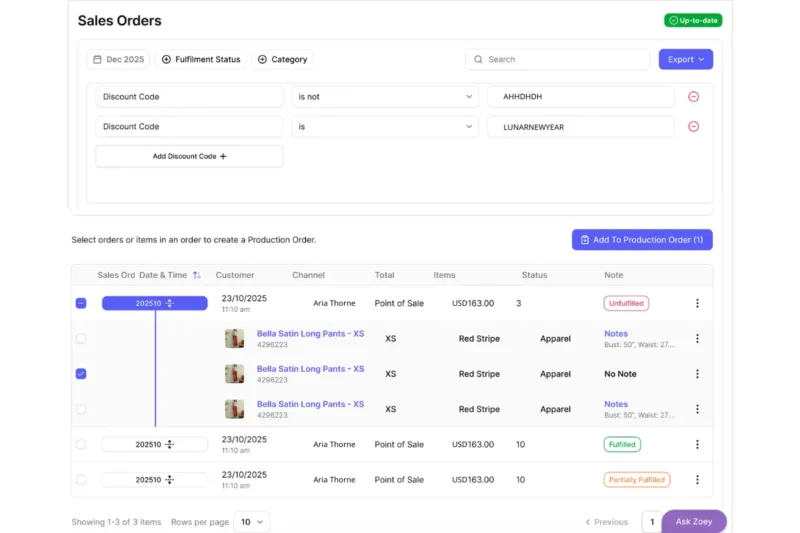
Nūl gives you one place to see, sort, and act on sales orders, so your team isn’t jumping between emails, spreadsheets, and different systems.
- Unified order visibility (all channels in one place)
- Display your sales orders in detail by date, fulfillment status, category, or discount code.
- Select sales orders and turn them into production orders in one step.
- Ask Zoey (AI assistant) to get answers fast about order status, what’s stuck, and where bottlenecks are without digging through screens or reports.
Conclusion
Sales order management is what keeps a sale from turning into delays, stock problems, and billing mistakes. When you have clear stages from intake and validation to fulfillment, tracking, and invoicing, orders move faster, accuracy improves, and customers get a smoother experience.
The biggest wins usually come from simple automation: syncing orders, using rule-based approvals, routing inventory smartly, guiding pick/pack/ship, and sending milestone updates.
If you build the process first and then apply modern tools (including AI) in the right places, you don’t just ship more orders, you run a calmer, more predictable operation that scales.