Inventory Discrepancy: Causes, Impacts, Preventions, Solutions

Inventory Discrepancy: Causes, Impacts, Preventions, Solutions

Dec 3, 2025

Inventory discrepancy is a mismatch between physical stock and system records, caused by errors, miscounts, or untracked movements that distort true inventory levels.

Inventory discrepancies are one of the most frustrating and costly problems for fashion brands. Whether you run a small boutique or a multi-store retail network, even minor inconsistencies between your physical stock and system records can throw off replenishment, distort forecasting, and lead to real revenue loss.

In fast-moving fashion environments, where sizes, colours, and styles shift quickly, ensuring accurate inventory data is critical to operational efficiency and customer satisfaction.

This guide breaks down what inventory discrepancy means, why it happens, its business impact, and how brands can prevent and resolve it. Also, we clarify how Nūl helps eliminate discrepancies before they become expensive problems.


What is Inventory Discrepancy?

An inventory discrepancy is any mismatch between the physical stock on hand and the inventory recorded in your system. It typically falls into three categories:

  • Under-stock discrepancy: Your physical count is less than what the system shows.

  • Over-stock discrepancy: Your physical count is more than what the system shows.

  • Mis-location discrepancy: The stock exists but is stored in the wrong shelf/bin/location, so it appears “missing” during counts.

Inventory discrepancies may also be referred to as:

  • Inventory record inaccuracy (IRI)

  • Inventory shrinkage

  • Stock mismatches

  • Inventory miscounts

  • Reconciliation errors

While some terms like “shrinkage” specifically refer to loss from theft/damage, they all point to gaps between expected and actual stock.

What is Inventory Discrepancy?

Inventory discrepancy is a mismatch between physical stock and system records.


10 Main Causes of Inventory Discrepancy


Data Entry Mistakes

These are human errors that occur during the manual input of inventory data, usually at the point of receiving, counting, or transferring stock. Even a small mistake like entering “12” instead of “21” can cause major gaps later. These mistakes can be:

  • Entering the wrong SKU or variant (like Small Blue T-Shirt (SKU-100) instead of Medium Blue T-Shirt (SKU-101);

  • Typing incorrect quantities (entering 140 received units when the actual count was 410);

  • Recording items under the wrong unit like receiving stock in cartons but entering the count as individual pieces (entering “10” as pieces instead of cartons, which should convert to 240 pieces);

  • Missing conversion steps (convert a bundled product back into its component parts when de-kitting or breaking down a larger item).


Picking and Packing Errors

These errors occur during the fulfillment process, where physical items are moved from storage to the shipping dock. The inventory discrepancy happens because the wrong item or quantity leaves the physical stock location. In busy operations, it’s easy for teams to:

  • Pick the wrong item (picking Product A instead of Product B but scans the correct outbound label for Product B. System shows Product B inventory decreasing, but physically Product A is gone.);

  • Pick the wrong quantity (Picking 10 units for an order requiring 8 units, but the system is only updated for 8 units.);

  • Mix SKUs in the same box (placing a loose unit of a different SKU into a packed box, reducing physical stock without the corresponding system reduction.);

  • Forget to scan items before packing, meaning the Warehouse Management System (WMS) is never notified of the order fulfillment.

These mistakes distort available-to-sell inventory.


Improper Receiving Procedures

Errors that occur at the point of inbound delivery, when staff reconcile the received goods against the Purchase Order (PO) or Advance Shipping Notice (ASN). When deliveries are not verified properly:

  • Barcodes aren’t scanned

  • Delivered quantities go un-checked (without physically counting, recording the full PO quantity even though only part of the shipment arrived);

  • Items are received into the wrong shelf/bin (goods are left in a generic staging area and never fully put away);

  • Staff skip quality check and reconciliation steps (without inspecting quality, receiving damaged or defective goods without immediately tagging them as non-saleable).

The system ends up showing stock that never truly arrived, or they are known as ghost stock.


Mishandled Returns

Thess errors are from incomplete or incorrect processing of customer returns, a area needing quality inspection and a complete re-stocking and return management process. Returns are a major source of hidden discrepancies because:

  • Items placed in the wrong return zone

  • Returned items not scanned back into the system (a returned item is physically put back on the shelf (good as new) but the system operator forgets to scan or enter the return to stock transaction.

  • Products recorded under the wrong SKU or condition (the customer returns Item A, but the return documentation or scanning process mistakenly logs it back into the system as Item B.);

  • Returned items is defined with incorrect condition (a returned item is damaged but is accidentally scanned or classified as "Saleable" in the system.)

This leads to mismatched inventory across saleable, damaged, or pending statuses.


Out-of-Sync Inventory Systems

Tech stack issues can create invisible errors:

  • POS, WMS, and OMS not syncing in real time (the WMS registers an item pick immediately, but the ERP/E-commerce platform only receives an update via an hourly batch file);

  • API failures or webhook delays (an e-commerce order is placed, but the notification to the WMS fails);

  • The system is overloaded during peak periods (like Black Friday);

  • Unmapped SKUs across multiple systems (the same physical product has different identifying codes (SKUs) in the e-commerce system versus the WMS).

When systems don’t speak to each other, inventory data goes stale very quickly.


Misplacement of Inventory

The physical location of stock does not match the location recorded in the WMS/system. This means items exist in the warehouse, but the team can’t find them because they’re:

  • Stored on the wrong shelf (putting Product X into bin A-1-3 but scanning the label for bin A-1-4);

  • Moved temporarily (for photography, quality check, consolidation without scanning the temporary location);

  • Left in receiving/staging (stock is received but never moved to its final, designated storage location, remaining in a transit area where pickers rarely look);

  • Mixed with another SKU (items are mixed together in a bin with a similar-looking product).

These “lost but present” items inflate stock discrepancies.


Theft, Damage, or Spoilage

The loss of inventory due to factors other than sales, which must be formally written off to keep system records accurate. These are often discovered during annual or cycle counts. Shrinkage can happen from:

  • Internal theft: Staff taking stock without recording it.

  • External Theft (Shoplifting): Inventory loss in a retail environment.

  • Damaged items not recorded as write-offs, but is still left on the shelf. The system still considers it available until.

  • Spoiled/expired goods are pulled from the shelf without scanning, but the system is not immediately updated to reflect the loss.

If the system isn't updated, the gap widens over time.


Multi-Location and Multi-Channel Errors

Issues that arise when a company operates across multiple storage sites, fulfillment centers, or selling channels (retail store, main warehouse, third-party logistics). Brands often face:

  • Undocumented transfers (moving stock between Warehouse A and Retail Store B without completing the necessary outbound transaction from A and inbound transaction at B);

  • Duplicate inventory across channels (e.g., having 10 units in total, but showing 10 units to the e-commerce store and also 10 units to the retail POS system);

  • Unallocated stock across locations (stock remains stuck in a digital "limbo" like a quarantine or transit location where the system cannot commit it to an order);

  • Ship-from-store stock not updated quickly (a retail store fulfills an online order, but the inventory deduction is only processed at the end of the day).

One missed step can misrepresent stock across every channel.


Supplier Delivery Inaccuracies

Discrepancies that originate with the supplier before stock even enters your warehouse. If your receiving team fails to catch them, the error is immediately baked into your inventory system.

  • Wrong quantities inside cartons (the supplier ships 90 units when the PO was for 100);

  • Mislabeled variants (the supplier mistakenly applies the label for Product A onto a carton containing Product B);

  • Mixed SKUs shipped together (a carton expected to contain 24 units of Product X actually contains 18 units of Product X and 6 units of Product Y);

  • Vendors substituting items without documentation (a supplier substitutes a requested variant (e.g., an older model) without updating the packing slip).

  • Pallet with wrong configuration: Discrepancies in the inner/outer pack quantities (like 10 units per case vs. 12 units per case, which multiply errors across large shipments).

If your team records these incorrectly, the discrepancy becomes permanent.


Unscanned Stock Movements

Internal movements of inventory that are necessary for warehouse flow but are often overlooked or skipped in the scanning proces.

  • Bin-to-bin transfers: Moving remaining stock from a near-empty primary bin to consolidate it in an overflow bin, but forgetting to scan the transfer.

  • Putaway steps: Stock is properly received into the system (increasing the total count) but is left in the "Receiving Staging" area.

  • Replenishing shelves: Moving stock from a reserve pallet location to a forward-picking face without recording the transfer.

  • Moving items for QC or staging: Components are moved from their storage racks to a dedicated Assembly Workstation to build a finished product.

Any movement not scanned = gaps in digital inventory.


What are the Impacts of Inventory Discrepancies?

Inventory discrepancies directly damage both profit and brand experience.


Stockouts

When your system shows available stock, but the physical shelf or bin is empty, a stockout occurs. This leads to immediate lost sales because the order cannot be fulfilled. Customers have to wait or cancel orders, which results in poor customer experience, loss of loyalty, and potential customer churn to a competitor who can fulfill the order immediately.

Also, operational cost is also increased because stockouts trigger emergency replenishment actions, backorders, and higher customer service workload.


Excess Stock

When the inventory the system shows is lower than physical stock, team thinks inventory is running low and places new purchase orders unnecessarily. This creates excess stock that sits in the warehouse for long periods, increasing storage costs, tying up cash, and raising the risk of damage, spoilage, or obsolescence. Excess stock quickly becomes aging inventory needing suitable markdown strategies.


Production Delays

In manufacturing or pre-order workflows, inaccurate material stock leads to stalled production. For example, if the system shows 1,000 units of a critical component, but the physical count is only 500, the production line stalls when the component runs out unexpectedly. This causes wasted labor time, idle machinery, missed delivery deadlines for finished goods, and often requires costly expedited material shipments.

>> Read more:


Inaccurate Inventory Valuation

Inventory discrepancies distort financial statements. Unreliable data affects the Cost of Goods Sold (COGS) calculation, leading to incorrect profit margins. The entire inventory valuation methods (FIFO, LIFO, etc.) is affected, making cash flow projections and tax filings unreliable.

This poses a significant risk during external audits, where documented inventory accuracy is really important. Even worse, it violates loan covenants or misrepresent the company's fiscal health to investors.


Higher Audit Effort

Teams spend days recounting and reconciling to fix numerical errors, pulling them away from productive work. Extra cycle counts, manual checks, and repeated investigations disrupt daily warehouse operations and delay other priorities. Over time, constant error correction creates frustration, lowers morale, and increases stress among warehouse and operations staff.


Increased Hidden Costs

Discrepancies cause invisible financial leaks: emergency shipments to fix stockouts, rush orders from suppliers, expedited transfers between warehouses, or discounting excess stock. Return handling becomes inefficient, and customer service must dedicate time to resolving avoidable issues. Also, you also pay for costly consultants to audit and fix broken WMS/ERP integrations.

>> Explore further: 16 Best Inventory Cost Reduction Strategies for Fashion Brands


Poor Demand Forecasting

Forecasting models cannot predict true demand when the underlying data is inaccurate. If a product was mistakenly shown as out of stock (when it was actually available), the system incorrectly records zero demand, leading to under-forecasting for the next cycle. Conversely, if excess stock is manually written off but the system never recorded the proper sales volume, it can lead to over-forecasting.

This leads to overbuying, underbuying, or skewed safety stock calculations. Over time, errors compound and cascade through replenishment planning.


Strained Supplier–Retailer Relationships

Wrong delivery claims, repeated adjustments, disputes over received quantities, and continuous requests for stock adjustments harm long-term trust with suppliers, 3PLs, and retail partners. Retailers may also receive inaccurate inventory allocations, leading to late deliveries or inconsistent store replenishment. These tensions can affect pricing negotiations and cooperative planning.

10 Main Causes of Inventory Discrepancy

10 Main Causes of Inventory Discrepancy


How to Prevent Stock Discrepancies?

Here are practical and proven methods to maintain accurate inventory:


Verify all inbound shipments

  • Blind Count: Require receiving staff to physically count the items before viewing the Purchase Order (PO) or supplier's packing slip to prevent bias.

  • Scan and Match: Scan every item's barcode and reconcile the actual received quantity against the expected quantity in the PO or ASN.

  • Quality Check (QC): Inspect for damage or mislabeling. Non-conforming items must be segregated and recorded as a variance before being put into saleable stock.


Standardize return handling workflows

  • Dedicated Zones: Establish separate, clearly labeled staging areas for items that are: Saleable (ready to restock), Damaged/Defective (to be written off), and Pending Inspection (quarantine).

  • Mandatory QC Scan: Require a system transaction to log the item's condition before it leaves the returns zone. The system must record the SKU and its new status/condition code.

  • Immediate System Update: Ensure the return-to-stock transaction is completed promptly to free up the stock for sale.


Use barcode or RFID scanning

  • Scan for Every Touchpoint: Mandate that all core movements like Receiving, Putaway, Picking, Transfer, and Shipment require a barcode or RFID scan of both the item and the location.

  • System Validation: Implement system logic that prevents a transaction from completing if the wrong item (SKU) or wrong quantity is scanned against the order/location record.


Use a real-time integrated inventory system

  • Use a Central WMS/ERP: Use a single robust system to manage core stock levels instead of fragmented spreadsheets or separate databases.

  • API/Webhook Integration: Ensure all external sales channels (e-commerce, POS, 3PLs) communicate with the central system via real-time APIs or webhooks rather than slow batch file transfers.

  • Central Allocation Pool: Define a single pool of available inventory, where AI/ML-driven demand forecasting determines the optimal allocation for each channel/location, ensuring stock is placed where it is most likely to be sold.

>> Consider inventory software:


Conduct periodic inventory audits

  • Category-Based Audits: Audit high-value, high-risk, or high-velocity items monthly, and low-risk items quarterly.

  • Location Audits: Audit specific sections of the warehouse known for higher rates of misplacement or error.

  • Reconciliation Protocol: Institute a clear process for investigating the cause of any variance found, not just fixing the number.

>> Read more: Perpetual vs Periodic Inventory System: Which to Choose?


Train staff on inventory handling

  • Process Certification: Require all new employees to pass a certification test on proper scanning, picking, and receiving protocols before handling live stock.

  • Recurrent Training: Conduct quarterly refreshers on common errors (e.g., UoM mistakes, bin-to-bin transfer failures) and new system updates.

  • Error Feedback Loop: Use system data to identify staff members with high error rates and provide targeted coaching rather than punitive action.


Automate variance alerts

  • Threshold Alerts: Set system alerts for any inventory adjustment that exceeds a specific value or quantity threshold (e.g., any adjustment over 10 units or $500).

  • Negative Inventory Alerts: Automatically flag any attempt by the system or staff to transact inventory into the negative (which indicates the system was wrong to begin with).

  • Location Inconsistency Alerts: Flag items that haven't moved from a staging location within a defined time frame (e.g., 48 hours), suggesting a skipped putaway step.

ML models can help this task by analyzing historical data and recent movements to predict the likely stock level. If the current system count differs from the model's prediction, a high-priority alert is issued.


Run regular cycle counts

  • ABC Analysis: Prioritize counting based on value. Count A-items (high value) most frequently, B-items less, and C-items least often.

  • Error-Based Counts: Use discrepancy data (from picking errors or alerts) to drive the count schedule, focusing on locations/SKUs known to have recent problems.

  • Dedicated Team: Assign a small, trained team to cycle counting to ensure consistency and prevent counting errors from disrupting picking operations.


Optimize warehouse layout

  • Clear Labeling: Every shelf, rack, bin, and staging area has a clear, unique, and scannable location ID that corresponds exactly to the WMS map.

  • Logical Grouping: Place similar items in non-adjacent locations to prevent accidental mixing of SKUs in the same bin (e.g., separate similar sizes or colors).

  • Dedicated Zones: Clearly mark zones for receiving, quality control, returns, and shipping to prevent stock from migrating out of its designated area.


Use IoT sensors or smart shelves

  • Weight Sensors: Use load-sensing shelves or bins to automatically log stock deductions based on weight, verifying the picker's scan.

  • Smart Beacons/Cameras: Deploy technology to verify movement logs, ensuring items are only present in their designated spots.

  • Robotics/Drones: Utilize automated tools for rapid, high-frequency physical counting in hard-to-reach areas.


What Actions Do You Take When There Are Discrepancies?

When a mismatch occurs, follow a structured process:

  • Recount the affected items: Immediately initiate a physical count of the specific SKU and its associated locations. This is the fastest way to confirm whether the system error is a shortage or a surplus.

  • Check recent stock movements (putaway, picking, packing): Did new stock from receiving get scanned into the wrong bin? Was the item picked for an order? Was the item moved without scanning the outbound or inbound location?

  • Inspect the storage locations (bin, rack, pallet position): Look for signs of misplacement, damaged goods, or mixed stock.

  • Review system logs (transactions, edits, transfers): Use the WMS/ERP system's audit log to trace all recent transactions related to the affected SKU and location for the past 24–48 hours (or since the last successful count).

  • Compare against receiving and return records: Pull up the original Purchase Order (PO) receipt and any recent Return Merchandise Authorization (RMA) logs.

  • Investigate potential shrinkage: If the variance is a shortage that cannot be explained by transactional error, the next most likely cause is theft or undocumented damage/spoilage.

  • Validate barcode or label accuracy: Physically inspect the item's barcode and compare its system ID against the adjacent item's barcode.

  • Identify recurring patterns (SKU, channel, staff-related): Analyze the discrepancy against a wider dataset. This is where AI/ML tools can help.

  • Correct the quantity in the system: Before correcting the quantity, assign the variance to a predefined Adjustment Code (e.g., A-Picking Error, B-Shrinkage, C-Receiving Error). Then, execute the system adjustment transaction.

  • Document the discrepancy + causes: Record the adjustment amount, the code, the date, and a narrative summary of the root cause found.

  • Monitor accuracy after the fix: Flag the corrected SKU/location for immediate, high-frequency cycle counts over the next few days.

These steps will help you solve discrepancies quicky, and avoid spreading or repeating in the future.


How Nūl Helps You Solve Inventory Discrepancy?

Nūl’s zero-waste fashion intelligence platform helps brands detect, prevent, and resolve discrepancies before they impact revenue.

  • Automated anomaly detection: Nūl flags unusual stock movements, missing units, or inconsistent inventory activity at SKU, size, colour, and store levels.

  • Real-time syncing with Shopify: No more delayed updates or stale stock views, your system always reflects reality.

  • Cycle count optimisation: Nūl highlights SKUs with high discrepancy risk, guiding your team on what to count first.

  • Replenishment and allocation tied to accurate data: The platform ignores erroneous data and prevents wrong restocking decisions.

  • Unified dashboard across locations: Eliminate duplication, mismatched stock across channels, and undocumented transfers.

  • Materials + BOM visibility: For brands producing in-house, Nūl also tracks fabric and trims to avoid production delays caused by inaccurate material stock.

  • Integrated PO + receiving workflows: Brands get structured receiving steps that reduce miscounts and documentation errors.

By improving data accuracy, Nūl ensures brands avoid unnecessary stockouts, prevent overbuying, and trust their numbers again.


Conclusion

Inventory discrepancies may be common, but they are not inevitable. With the right workflows, technology, and real-time visibility, fashion brands can significantly reduce stock mismatches and protect their margins. Accurate inventory is the foundation of effective forecasting, replenishment, and zero-waste operations.

Nūl Content Team

Article by

Nūl Content Team

An Experienced Research & Knowledge Team

The Nūl Content Team combines expertise in technology, fashion, and supply chain management to deliver clear, practical insights. Guided by Nūl’s mission to end overproduction, we create content that helps brands forecast demand more accurately, optimize inventory, and build sustainable operations. Every piece we publish is grounded in real-world experience, ensuring it’s both credible and actionable.

LinkedIn Profile

More From Blog

Co-Build With Us

We are so keen to get this right. If the problem statement resonates, please reach out and we’d love to co-build with you so fits right into your existing workflow.

Co-Build With Us

We are so keen to get this right. If the problem statement resonates, please reach out and we’d love to co-build with you so fits right into your existing workflow.

Co-build with us
Co-build with us

Co-Build With Us

We are so keen to get this right. If the problem statement resonates, please reach out and we’d love to co-build with you so fits right into your existing workflow.

Co-build with us
Co-build with us

More From Blog

Inventory Discrepancy: Causes, Impacts, Preventions, Solutions

Inventory Discrepancy: Causes, Impacts, Preventions, Solutions

Dec 3, 2025

Inventory discrepancy is a mismatch between physical stock and system records, caused by errors, miscounts, or untracked movements that distort true inventory levels.

Inventory discrepancies are one of the most frustrating and costly problems for fashion brands. Whether you run a small boutique or a multi-store retail network, even minor inconsistencies between your physical stock and system records can throw off replenishment, distort forecasting, and lead to real revenue loss.

In fast-moving fashion environments, where sizes, colours, and styles shift quickly, ensuring accurate inventory data is critical to operational efficiency and customer satisfaction.

This guide breaks down what inventory discrepancy means, why it happens, its business impact, and how brands can prevent and resolve it. Also, we clarify how Nūl helps eliminate discrepancies before they become expensive problems.


What is Inventory Discrepancy?

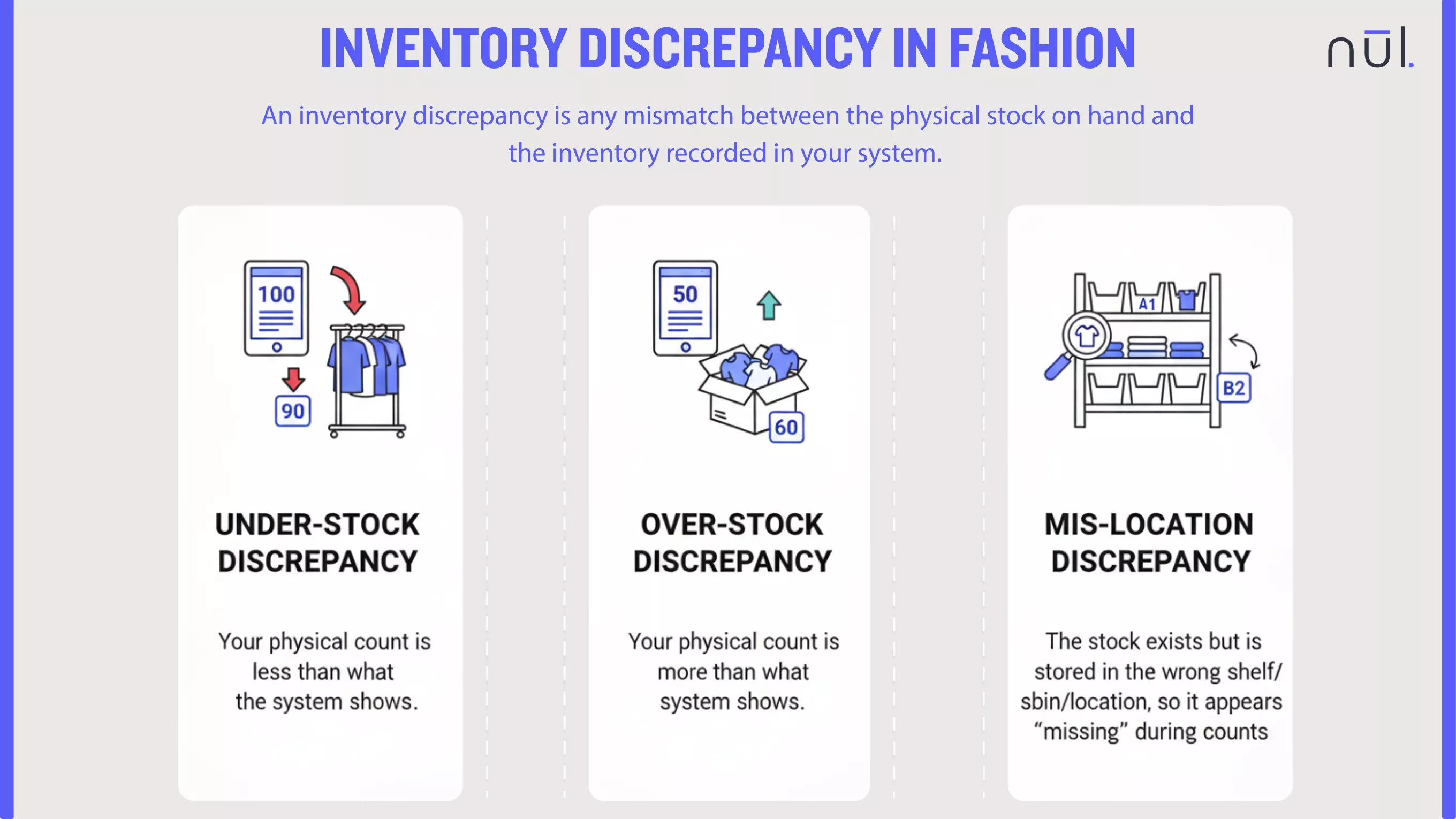
An inventory discrepancy is any mismatch between the physical stock on hand and the inventory recorded in your system. It typically falls into three categories:

  • Under-stock discrepancy: Your physical count is less than what the system shows.

  • Over-stock discrepancy: Your physical count is more than what the system shows.

  • Mis-location discrepancy: The stock exists but is stored in the wrong shelf/bin/location, so it appears “missing” during counts.

Inventory discrepancies may also be referred to as:

  • Inventory record inaccuracy (IRI)

  • Inventory shrinkage

  • Stock mismatches

  • Inventory miscounts

  • Reconciliation errors

While some terms like “shrinkage” specifically refer to loss from theft/damage, they all point to gaps between expected and actual stock.
What is Inventory Discrepancy?

Inventory discrepancy is a mismatch between physical stock and system records.


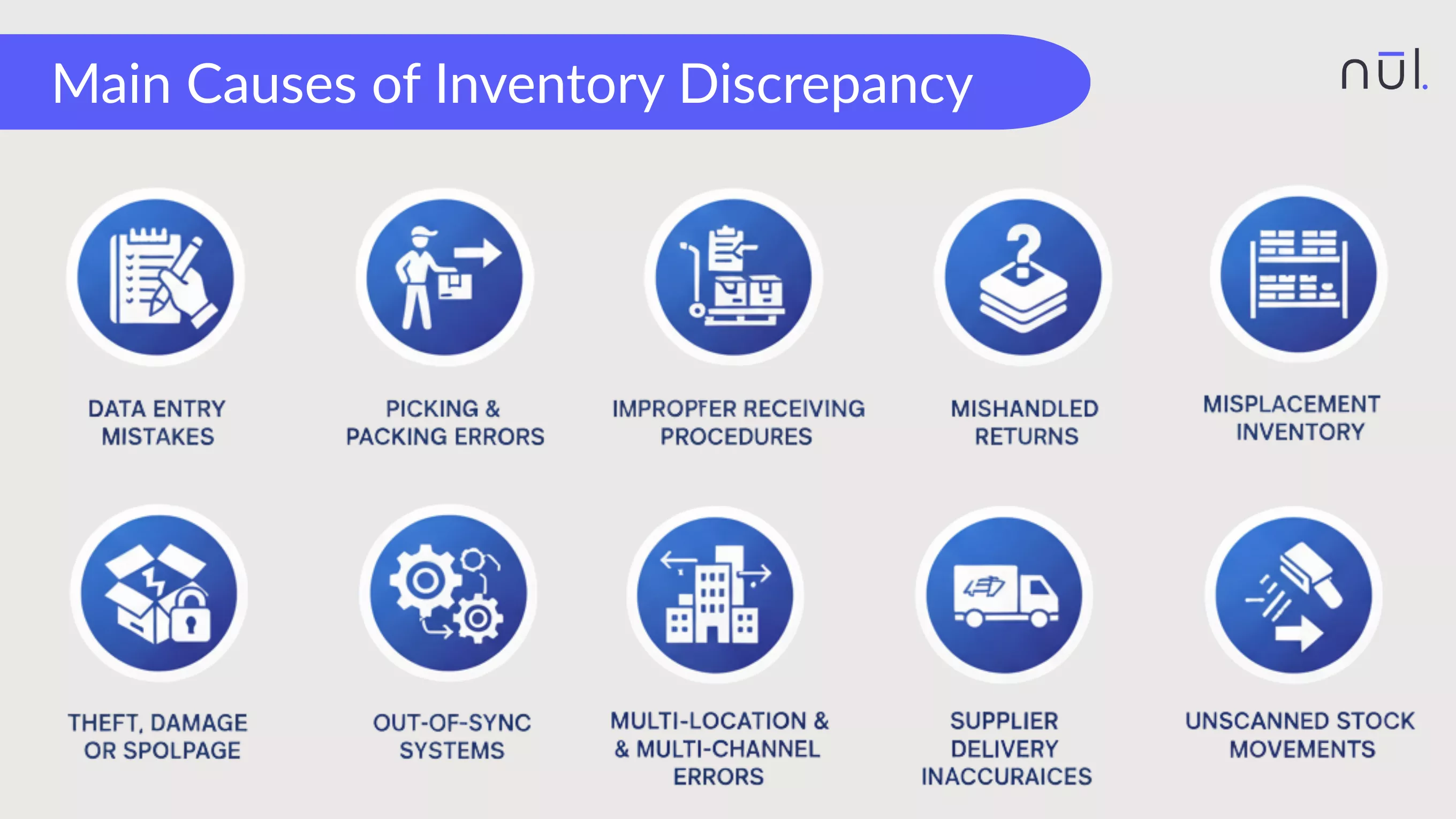
10 Main Causes of Inventory Discrepancy


Data Entry Mistakes

These are human errors that occur during the manual input of inventory data, usually at the point of receiving, counting, or transferring stock. Even a small mistake like entering “12” instead of “21” can cause major gaps later. These mistakes can be:

  • Entering the wrong SKU or variant (like Small Blue T-Shirt (SKU-100) instead of Medium Blue T-Shirt (SKU-101);

  • Typing incorrect quantities (entering 140 received units when the actual count was 410);

  • Recording items under the wrong unit like receiving stock in cartons but entering the count as individual pieces (entering “10” as pieces instead of cartons, which should convert to 240 pieces);

  • Missing conversion steps (convert a bundled product back into its component parts when de-kitting or breaking down a larger item).


Picking and Packing Errors

These errors occur during the fulfillment process, where physical items are moved from storage to the shipping dock. The inventory discrepancy happens because the wrong item or quantity leaves the physical stock location. In busy operations, it’s easy for teams to:

  • Pick the wrong item (picking Product A instead of Product B but scans the correct outbound label for Product B. System shows Product B inventory decreasing, but physically Product A is gone.);

  • Pick the wrong quantity (Picking 10 units for an order requiring 8 units, but the system is only updated for 8 units.);

  • Mix SKUs in the same box (placing a loose unit of a different SKU into a packed box, reducing physical stock without the corresponding system reduction.);

  • Forget to scan items before packing, meaning the Warehouse Management System (WMS) is never notified of the order fulfillment.

These mistakes distort available-to-sell inventory.


Improper Receiving Procedures

Errors that occur at the point of inbound delivery, when staff reconcile the received goods against the Purchase Order (PO) or Advance Shipping Notice (ASN). When deliveries are not verified properly:

  • Barcodes aren’t scanned

  • Delivered quantities go un-checked (without physically counting, recording the full PO quantity even though only part of the shipment arrived);

  • Items are received into the wrong shelf/bin (goods are left in a generic staging area and never fully put away);

  • Staff skip quality check and reconciliation steps (without inspecting quality, receiving damaged or defective goods without immediately tagging them as non-saleable).

The system ends up showing stock that never truly arrived, or they are known as ghost stock.


Mishandled Returns

Thess errors are from incomplete or incorrect processing of customer returns, a area needing quality inspection and a complete re-stocking and return management process. Returns are a major source of hidden discrepancies because:

  • Items placed in the wrong return zone

  • Returned items not scanned back into the system (a returned item is physically put back on the shelf (good as new) but the system operator forgets to scan or enter the return to stock transaction.

  • Products recorded under the wrong SKU or condition (the customer returns Item A, but the return documentation or scanning process mistakenly logs it back into the system as Item B.);

  • Returned items is defined with incorrect condition (a returned item is damaged but is accidentally scanned or classified as "Saleable" in the system.)

This leads to mismatched inventory across saleable, damaged, or pending statuses.


Out-of-Sync Inventory Systems

Tech stack issues can create invisible errors:

  • POS, WMS, and OMS not syncing in real time (the WMS registers an item pick immediately, but the ERP/E-commerce platform only receives an update via an hourly batch file);

  • API failures or webhook delays (an e-commerce order is placed, but the notification to the WMS fails);

  • The system is overloaded during peak periods (like Black Friday);

  • Unmapped SKUs across multiple systems (the same physical product has different identifying codes (SKUs) in the e-commerce system versus the WMS).

When systems don’t speak to each other, inventory data goes stale very quickly.


Misplacement of Inventory

The physical location of stock does not match the location recorded in the WMS/system. This means items exist in the warehouse, but the team can’t find them because they’re:

  • Stored on the wrong shelf (putting Product X into bin A-1-3 but scanning the label for bin A-1-4);

  • Moved temporarily (for photography, quality check, consolidation without scanning the temporary location);

  • Left in receiving/staging (stock is received but never moved to its final, designated storage location, remaining in a transit area where pickers rarely look);

  • Mixed with another SKU (items are mixed together in a bin with a similar-looking product).

These “lost but present” items inflate stock discrepancies.


Theft, Damage, or Spoilage

The loss of inventory due to factors other than sales, which must be formally written off to keep system records accurate. These are often discovered during annual or cycle counts. Shrinkage can happen from:

  • Internal theft: Staff taking stock without recording it.

  • External Theft (Shoplifting): Inventory loss in a retail environment.

  • Damaged items not recorded as write-offs, but is still left on the shelf. The system still considers it available until.

  • Spoiled/expired goods are pulled from the shelf without scanning, but the system is not immediately updated to reflect the loss.

If the system isn't updated, the gap widens over time.


Multi-Location and Multi-Channel Errors

Issues that arise when a company operates across multiple storage sites, fulfillment centers, or selling channels (retail store, main warehouse, third-party logistics). Brands often face:

  • Undocumented transfers (moving stock between Warehouse A and Retail Store B without completing the necessary outbound transaction from A and inbound transaction at B);

  • Duplicate inventory across channels (e.g., having 10 units in total, but showing 10 units to the e-commerce store and also 10 units to the retail POS system);

  • Unallocated stock across locations (stock remains stuck in a digital "limbo" like a quarantine or transit location where the system cannot commit it to an order);

  • Ship-from-store stock not updated quickly (a retail store fulfills an online order, but the inventory deduction is only processed at the end of the day).

One missed step can misrepresent stock across every channel.


Supplier Delivery Inaccuracies

Discrepancies that originate with the supplier before stock even enters your warehouse. If your receiving team fails to catch them, the error is immediately baked into your inventory system.

  • Wrong quantities inside cartons (the supplier ships 90 units when the PO was for 100);

  • Mislabeled variants (the supplier mistakenly applies the label for Product A onto a carton containing Product B);

  • Mixed SKUs shipped together (a carton expected to contain 24 units of Product X actually contains 18 units of Product X and 6 units of Product Y);

  • Vendors substituting items without documentation (a supplier substitutes a requested variant (e.g., an older model) without updating the packing slip).

  • Pallet with wrong configuration: Discrepancies in the inner/outer pack quantities (like 10 units per case vs. 12 units per case, which multiply errors across large shipments).

If your team records these incorrectly, the discrepancy becomes permanent.


Unscanned Stock Movements

Internal movements of inventory that are necessary for warehouse flow but are often overlooked or skipped in the scanning proces.

  • Bin-to-bin transfers: Moving remaining stock from a near-empty primary bin to consolidate it in an overflow bin, but forgetting to scan the transfer.

  • Putaway steps: Stock is properly received into the system (increasing the total count) but is left in the "Receiving Staging" area.

  • Replenishing shelves: Moving stock from a reserve pallet location to a forward-picking face without recording the transfer.

  • Moving items for QC or staging: Components are moved from their storage racks to a dedicated Assembly Workstation to build a finished product.

Any movement not scanned = gaps in digital inventory.


What are the Impacts of Inventory Discrepancies?

Inventory discrepancies directly damage both profit and brand experience.


Stockouts

When your system shows available stock, but the physical shelf or bin is empty, a stockout occurs. This leads to immediate lost sales because the order cannot be fulfilled. Customers have to wait or cancel orders, which results in poor customer experience, loss of loyalty, and potential customer churn to a competitor who can fulfill the order immediately.

Also, operational cost is also increased because stockouts trigger emergency replenishment actions, backorders, and higher customer service workload.


Excess Stock

When the inventory the system shows is lower than physical stock, team thinks inventory is running low and places new purchase orders unnecessarily. This creates excess stock that sits in the warehouse for long periods, increasing storage costs, tying up cash, and raising the risk of damage, spoilage, or obsolescence. Excess stock quickly becomes aging inventory needing suitable markdown strategies.


Production Delays

In manufacturing or pre-order workflows, inaccurate material stock leads to stalled production. For example, if the system shows 1,000 units of a critical component, but the physical count is only 500, the production line stalls when the component runs out unexpectedly. This causes wasted labor time, idle machinery, missed delivery deadlines for finished goods, and often requires costly expedited material shipments.

>> Read more:


Inaccurate Inventory Valuation

Inventory discrepancies distort financial statements. Unreliable data affects the Cost of Goods Sold (COGS) calculation, leading to incorrect profit margins. The entire inventory valuation methods (FIFO, LIFO, etc.) is affected, making cash flow projections and tax filings unreliable.

This poses a significant risk during external audits, where documented inventory accuracy is really important. Even worse, it violates loan covenants or misrepresent the company's fiscal health to investors.


Higher Audit Effort

Teams spend days recounting and reconciling to fix numerical errors, pulling them away from productive work. Extra cycle counts, manual checks, and repeated investigations disrupt daily warehouse operations and delay other priorities. Over time, constant error correction creates frustration, lowers morale, and increases stress among warehouse and operations staff.


Increased Hidden Costs

Discrepancies cause invisible financial leaks: emergency shipments to fix stockouts, rush orders from suppliers, expedited transfers between warehouses, or discounting excess stock. Return handling becomes inefficient, and customer service must dedicate time to resolving avoidable issues. Also, you also pay for costly consultants to audit and fix broken WMS/ERP integrations.

>> Explore further: 16 Best Inventory Cost Reduction Strategies for Fashion Brands


Poor Demand Forecasting

Forecasting models cannot predict true demand when the underlying data is inaccurate. If a product was mistakenly shown as out of stock (when it was actually available), the system incorrectly records zero demand, leading to under-forecasting for the next cycle. Conversely, if excess stock is manually written off but the system never recorded the proper sales volume, it can lead to over-forecasting.

This leads to overbuying, underbuying, or skewed safety stock calculations. Over time, errors compound and cascade through replenishment planning.


Strained Supplier–Retailer Relationships

Wrong delivery claims, repeated adjustments, disputes over received quantities, and continuous requests for stock adjustments harm long-term trust with suppliers, 3PLs, and retail partners. Retailers may also receive inaccurate inventory allocations, leading to late deliveries or inconsistent store replenishment. These tensions can affect pricing negotiations and cooperative planning.
10 Main Causes of Inventory Discrepancy

10 Main Causes of Inventory Discrepancy


How to Prevent Stock Discrepancies?

Here are practical and proven methods to maintain accurate inventory:


Verify all inbound shipments

  • Blind Count: Require receiving staff to physically count the items before viewing the Purchase Order (PO) or supplier's packing slip to prevent bias.

  • Scan and Match: Scan every item's barcode and reconcile the actual received quantity against the expected quantity in the PO or ASN.

  • Quality Check (QC): Inspect for damage or mislabeling. Non-conforming items must be segregated and recorded as a variance before being put into saleable stock.


Standardize return handling workflows

  • Dedicated Zones: Establish separate, clearly labeled staging areas for items that are: Saleable (ready to restock), Damaged/Defective (to be written off), and Pending Inspection (quarantine).

  • Mandatory QC Scan: Require a system transaction to log the item's condition before it leaves the returns zone. The system must record the SKU and its new status/condition code.

  • Immediate System Update: Ensure the return-to-stock transaction is completed promptly to free up the stock for sale.


Use barcode or RFID scanning

  • Scan for Every Touchpoint: Mandate that all core movements like Receiving, Putaway, Picking, Transfer, and Shipment require a barcode or RFID scan of both the item and the location.

  • System Validation: Implement system logic that prevents a transaction from completing if the wrong item (SKU) or wrong quantity is scanned against the order/location record.


Use a real-time integrated inventory system

  • Use a Central WMS/ERP: Use a single robust system to manage core stock levels instead of fragmented spreadsheets or separate databases.

  • API/Webhook Integration: Ensure all external sales channels (e-commerce, POS, 3PLs) communicate with the central system via real-time APIs or webhooks rather than slow batch file transfers.

  • Central Allocation Pool: Define a single pool of available inventory, where AI/ML-driven demand forecasting determines the optimal allocation for each channel/location, ensuring stock is placed where it is most likely to be sold.

>> Consider inventory software:


Conduct periodic inventory audits

  • Category-Based Audits: Audit high-value, high-risk, or high-velocity items monthly, and low-risk items quarterly.

  • Location Audits: Audit specific sections of the warehouse known for higher rates of misplacement or error.

  • Reconciliation Protocol: Institute a clear process for investigating the cause of any variance found, not just fixing the number.

>> Read more: Perpetual vs Periodic Inventory System: Which to Choose?


Train staff on inventory handling

  • Process Certification: Require all new employees to pass a certification test on proper scanning, picking, and receiving protocols before handling live stock.

  • Recurrent Training: Conduct quarterly refreshers on common errors (e.g., UoM mistakes, bin-to-bin transfer failures) and new system updates.

  • Error Feedback Loop: Use system data to identify staff members with high error rates and provide targeted coaching rather than punitive action.


Automate variance alerts

  • Threshold Alerts: Set system alerts for any inventory adjustment that exceeds a specific value or quantity threshold (e.g., any adjustment over 10 units or $500).

  • Negative Inventory Alerts: Automatically flag any attempt by the system or staff to transact inventory into the negative (which indicates the system was wrong to begin with).

  • Location Inconsistency Alerts: Flag items that haven't moved from a staging location within a defined time frame (e.g., 48 hours), suggesting a skipped putaway step.

ML models can help this task by analyzing historical data and recent movements to predict the likely stock level. If the current system count differs from the model's prediction, a high-priority alert is issued.


Run regular cycle counts

  • ABC Analysis: Prioritize counting based on value. Count A-items (high value) most frequently, B-items less, and C-items least often.

  • Error-Based Counts: Use discrepancy data (from picking errors or alerts) to drive the count schedule, focusing on locations/SKUs known to have recent problems.

  • Dedicated Team: Assign a small, trained team to cycle counting to ensure consistency and prevent counting errors from disrupting picking operations.


Optimize warehouse layout

  • Clear Labeling: Every shelf, rack, bin, and staging area has a clear, unique, and scannable location ID that corresponds exactly to the WMS map.

  • Logical Grouping: Place similar items in non-adjacent locations to prevent accidental mixing of SKUs in the same bin (e.g., separate similar sizes or colors).

  • Dedicated Zones: Clearly mark zones for receiving, quality control, returns, and shipping to prevent stock from migrating out of its designated area.


Use IoT sensors or smart shelves

  • Weight Sensors: Use load-sensing shelves or bins to automatically log stock deductions based on weight, verifying the picker's scan.

  • Smart Beacons/Cameras: Deploy technology to verify movement logs, ensuring items are only present in their designated spots.

  • Robotics/Drones: Utilize automated tools for rapid, high-frequency physical counting in hard-to-reach areas.


What Actions Do You Take When There Are Discrepancies?

When a mismatch occurs, follow a structured process:

  • Recount the affected items: Immediately initiate a physical count of the specific SKU and its associated locations. This is the fastest way to confirm whether the system error is a shortage or a surplus.

  • Check recent stock movements (putaway, picking, packing): Did new stock from receiving get scanned into the wrong bin? Was the item picked for an order? Was the item moved without scanning the outbound or inbound location?

  • Inspect the storage locations (bin, rack, pallet position): Look for signs of misplacement, damaged goods, or mixed stock.

  • Review system logs (transactions, edits, transfers): Use the WMS/ERP system's audit log to trace all recent transactions related to the affected SKU and location for the past 24–48 hours (or since the last successful count).

  • Compare against receiving and return records: Pull up the original Purchase Order (PO) receipt and any recent Return Merchandise Authorization (RMA) logs.

  • Investigate potential shrinkage: If the variance is a shortage that cannot be explained by transactional error, the next most likely cause is theft or undocumented damage/spoilage.

  • Validate barcode or label accuracy: Physically inspect the item's barcode and compare its system ID against the adjacent item's barcode.

  • Identify recurring patterns (SKU, channel, staff-related): Analyze the discrepancy against a wider dataset. This is where AI/ML tools can help.

  • Correct the quantity in the system: Before correcting the quantity, assign the variance to a predefined Adjustment Code (e.g., A-Picking Error, B-Shrinkage, C-Receiving Error). Then, execute the system adjustment transaction.

  • Document the discrepancy + causes: Record the adjustment amount, the code, the date, and a narrative summary of the root cause found.

  • Monitor accuracy after the fix: Flag the corrected SKU/location for immediate, high-frequency cycle counts over the next few days.

These steps will help you solve discrepancies quicky, and avoid spreading or repeating in the future.


How Nūl Helps You Solve Inventory Discrepancy?

Nūl’s zero-waste fashion intelligence platform helps brands detect, prevent, and resolve discrepancies before they impact revenue.

  • Automated anomaly detection: Nūl flags unusual stock movements, missing units, or inconsistent inventory activity at SKU, size, colour, and store levels.

  • Real-time syncing with Shopify: No more delayed updates or stale stock views, your system always reflects reality.

  • Cycle count optimisation: Nūl highlights SKUs with high discrepancy risk, guiding your team on what to count first.

  • Replenishment and allocation tied to accurate data: The platform ignores erroneous data and prevents wrong restocking decisions.

  • Unified dashboard across locations: Eliminate duplication, mismatched stock across channels, and undocumented transfers.

  • Materials + BOM visibility: For brands producing in-house, Nūl also tracks fabric and trims to avoid production delays caused by inaccurate material stock.

  • Integrated PO + receiving workflows: Brands get structured receiving steps that reduce miscounts and documentation errors.

By improving data accuracy, Nūl ensures brands avoid unnecessary stockouts, prevent overbuying, and trust their numbers again.


Conclusion

Inventory discrepancies may be common, but they are not inevitable. With the right workflows, technology, and real-time visibility, fashion brands can significantly reduce stock mismatches and protect their margins. Accurate inventory is the foundation of effective forecasting, replenishment, and zero-waste operations.

Nūl Content Team
Nūl Content Team

Article by

Nūl Content Team

An Experienced Research & Knowledge Team

An Experienced Research & Knowledge Team

The Nūl Content Team combines expertise in technology, fashion, and supply chain management to deliver clear, practical insights. Guided by Nūl’s mission to end overproduction, we create content that helps brands forecast demand more accurately, optimize inventory, and build sustainable operations. Every piece we publish is grounded in real-world experience, ensuring it’s both credible and actionable.

LinkedIn Profile